
One order can contain different physical states
A customer ordered three items. Two are in a parcel that has already left; the third is waiting for stock. The customer no longer wants the remaining item. An instruction to “cancel the order” does not tell the warehouse which work still exists or tell support what has already happened.
The operational object is the unshipped balance. Identify it by order, item, quantity and fulfillment reference. Keep the completed shipment separate so an action on the remainder does not create a misleading history for the goods already dispatched.
Check the system’s actual cancellation path
Shopify’s order-cancellation guidance states that a partially fulfilled order cannot simply be canceled through the normal order-cancellation action. Its app-based fulfillment guidance also distinguishes a cancellation request from the service’s acceptance or rejection. These are documented Shopify behaviors, not a guarantee that a particular 3PL connector handles every partial-order case the same way.
Before changing a live order, confirm the supported path with the integration owner. A display status is not a physical stop. Nor should a team undo a valid shipment record merely to make a convenient button appear.
Build a quantity reconciliation first
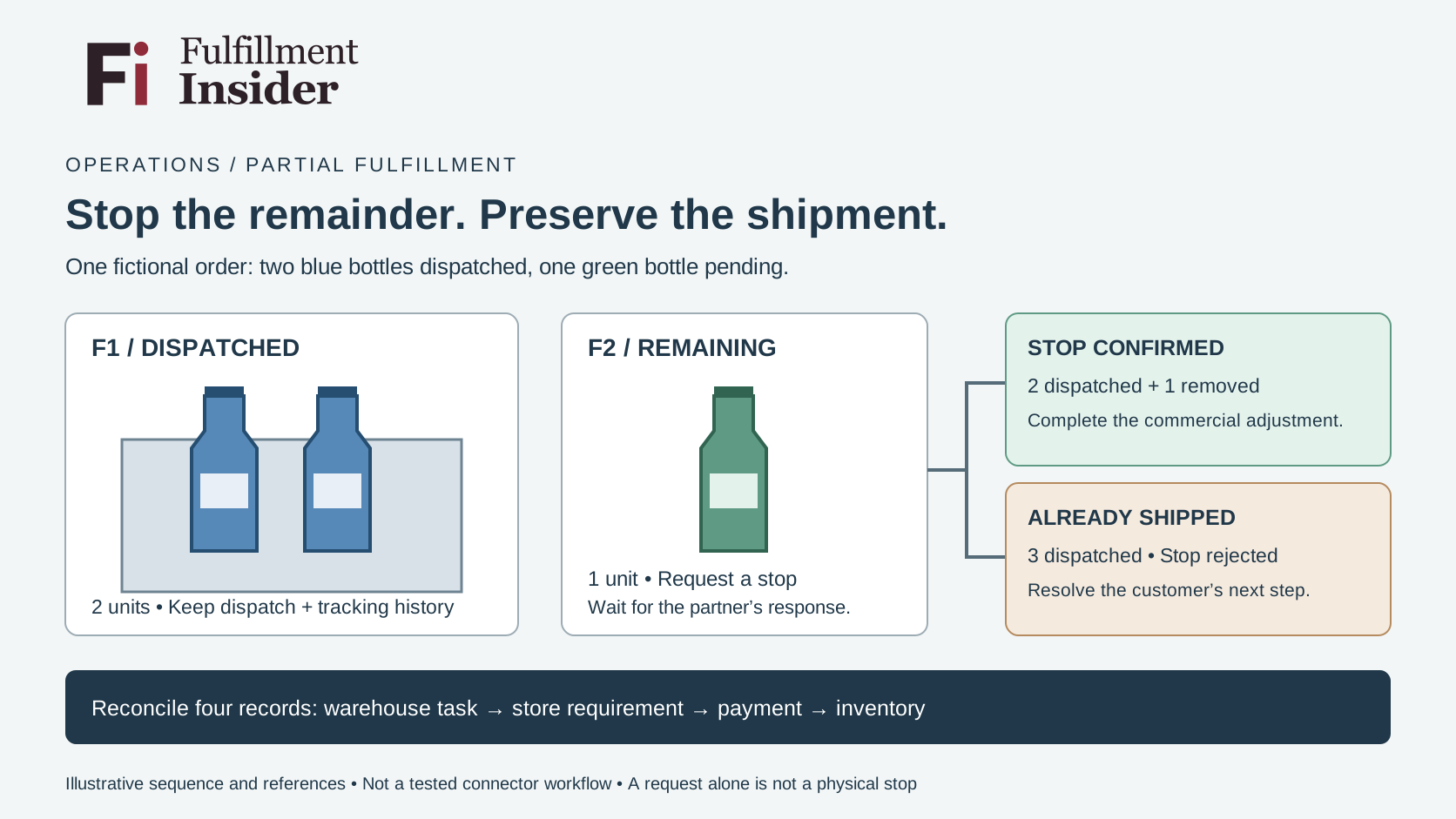
Our fictional order contains two blue bottles and one green bottle. Both blue bottles have been dispatched under fulfillment F1. The green bottle remains assigned to F2. The customer asks to remove only the green bottle.
| Record | Quantity | Required treatment |
|---|---|---|
| Blue bottles in F1 | 2 | Retain dispatch and tracking history |
| Green bottle in F2 | 1 | Request a stop for this remaining quantity |
| Additional shipment authorized | 0 | Do not create replacement work automatically |
Before the request, the original three units reconcile as two dispatched plus one pending. If the partner confirms the remaining work stopped and the commercial adjustment is completed, the three reconcile as two dispatched plus one removed from the requirement. If the stop is rejected because that item has already shipped, the physical position is three dispatched; it needs the appropriate customer resolution instead.
This is a desk walkthrough of two possible responses, not a test of Shopify or a warehouse. The fulfillment references are invented. The intended control is a quantity trail, not a universal sequence of admin clicks.
Reconcile four records, not just the order badge
Check the warehouse task, the store’s remaining fulfillment requirement, the financial adjustment and inventory availability. Record the owner of each change. A refund decision does not by itself prove that a pick task ended, and a stopped task does not prove that the customer’s payment was adjusted.
If the item was already picked, ask whether it is physically returned to an eligible storage location or awaiting that movement. Do not assume that stopping shipment makes it immediately available to another order. If a label was created, resolve its use or void status through the supported workflow without disturbing the tracking for F1.
Make the response explicit
The useful confirmation says which fulfillment reference and quantity were stopped, when the action was accepted and whether any physical work remains. If the system cannot make the required distinction, hold the manual intervention for the integration owner rather than improvising a whole-order reset.
After the change, look for new or duplicated work for the removed item. Also verify that customer messaging still describes the two dispatched bottles correctly. The customer should not receive a notice that suggests the parcel already in transit has vanished.
When evaluating a 3PL, put this scenario into an agreed demonstration using test records. Ask for both the accepted-stop and rejected-stop outcomes. A partner that can explain the remaining quantity clearly is easier to manage than one that relies on a single reassuring order status.
Further reading
Sources
- https://help.shopify.com/en/manual/fulfillment/fulfilling-orders/app-fulfillment — accessed 2026-10-31.
- https://help.shopify.com/en/manual/fulfillment/managing-orders/canceling-orders — accessed 2026-10-31.